2025 Guide: Singapore Passport & Visa Photo Requirements
Master MyICA biometric standards with our 2025 guide. Learn to avoid 15 silent rejection triggers, capture newborn photos at home, and navigate global visa specs for the US, China, and Malaysia.
If you’ve ever sat in a cramped, humid photo booth at a neighborhood mall, squinting into a dirty lens while a timer counts down, you know the stress of the "instant" passport photo. You walk out with a strip of four prints, hoping they look enough like you to satisfy the Immigration & Checkpoints Authority (ICA).
But here’s the reality in 2025: those physical prints are relics. The ICA has moved almost entirely to digital submissions via the MyICA portal. More importantly, they aren’t using humans for the first pass on your photo. They’re using sophisticated AI algorithms that check for things your eyes—and even an old-school booth camera—can’t detect.
Using a dedicated passport photo app or a professional passport size photo editor is now the gold standard to ensure your biometric data meets international standards. I’ve seen countless travelers get their applications kicked back not because they don't look like their photo, but because of a "floating head" effect or a stray hair blocking an eyebrow. This guide is here to make sure that doesn’t happen to you.
The High Stakes of Digital Identity in 2025 #
When the ICA introduced its New Integrated Terminal (NIT) and upgraded the MyICA portal, it wasn't just a UI refresh. They integrated biometric verification that aligns with ICAO Document 9303 standards. Your photo is no longer just a picture; it’s a data set for a machine.
The MyICA AI Revolution #
Today, when you upload a photo, an automated system scans it for over 30 specific biometric markers. It calculates the exact distance between your pupils, the width of your mouth, and the height of your forehead. If your photo is poorly lit or hair obscures these markers, the system flags it. This isn’t just a "no"; it’s a delay. A rejection can push your passport renewal back by weeks—a nightmare if you’ve got a flight booked for the school holidays.
Why 'Good Enough' No Longer Works #
In the past, a human officer might overlook a slightly dark shadow under your chin. An AI won’t. To an algorithm, a shadow can look like a structural facial feature, throwing off your entire biometric profile. We’re seeing a spike in rejections for photos that look fine to the human eye but fail the machine check. You need a photo that’s technically perfect, not just one where you look good.
The 15 Silent Rejection Killers #
Most people know the basics: white background, no hat, look at the camera. But the "silent killers" are the nuanced rules buried in the fine print. After analyzing thousands of submissions, I’ve narrowed down the most common pitfalls.
1. The 'Invisible' Eyebrow Rule #
This is the single most common reason for rejection. According to official ICA photo guidelines, your eyebrows must be clearly visible. If your bangs cover even the top arc of your eyebrows, the facial recognition software cannot accurately map your face. Use a passport photo maker that flags these visibility issues before you submit.
2. The Floating Head Syndrome (Contrast Issues) #
Singaporeans love wearing white, but wearing a white shirt against the mandatory white background is a recipe for rejection. This creates a "floating head" effect where the software can’t distinguish your shoulders from the background. The Fix: Wear a dark-colored shirt—navy, black, or deep red.
3. Shadows and the 'Ears' Problem #
While the ICA no longer strictly requires ears to be visible (unless they’re a distinguishing feature), shadows cast by the ears or hair onto the neck are a major issue. Use "flat" lighting by facing a large window during the day.
4. The 'Selfie' Arm Distortion #
Never take a passport photo as a selfie. Holding the phone at arm’s length causes the wide-angle lens to distort your facial features—making your nose look larger and ears look smaller. This changes your biometric ratios.
5. Eye Contact and Gaze #
Both eyes must be open and looking directly at the lens. Ensure your gaze is centered.
6. Over-Editing and 'Beauty' Filters #
Using a filter to smooth skin or sharpen your jawline is a direct path to rejection. If the AI detects "unnatural" skin textures or altered bone structures, it will fail the photo immediately.
7. Tinted Glasses and Frames #
The ICA allows glasses only if they don’t have tinted lenses and the frames don't obscure your eyes. However, the U.S. Department of State's photo page bans glasses entirely. Our advice? Take them off to avoid glare rejections.
8. Head Tilt and Shoulders #
Your head must be perfectly level. A slight tilt—even a few degrees—changes the perceived distance between your eyes and ears.
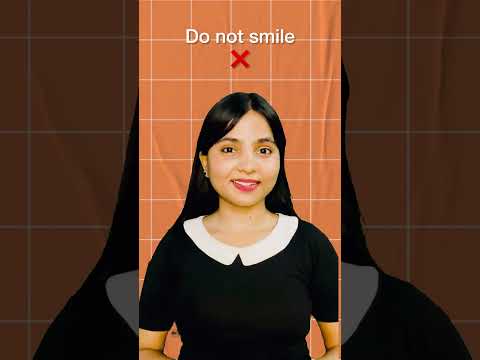
9. Mouth Position #
You must have a neutral expression. No teeth showing. A wide smile changes the shape of your cheeks, interfering with facial mapping.
10. Background Shadows #
Stand about half a meter away from the background. If you lean directly against a wall, your head will cast a shadow that the AI might interpret as part of your head shape.
11. Photo Recency #
The ICA requires the photo to be taken within the last three months. Metadata checks or facial aging algorithms often catch those trying to reuse old IC photos.
12. Hair Volume and Framing #
Ensure voluminous hair doesn’t push your head out of the required frame. The ICA requires specific Singapore passport photo requirements regarding the distance from chin to crown.
13. Flash Reflection #
A direct flash often creates a "hot spot" on the forehead or nose, erasing skin detail and confusing biometric sensors.
14. Low Resolution #
Cropping a small part of a larger photo results in pixelation. The ICA requires a sharp, clear image.
15. The 'Crooked' Crop #
The distance from the top of the head to the edge of the frame must be perfectly balanced. An off-center crop is an instant disqualifier.
The Newborn Mastery Module: Capturing Infant Photos at Home #
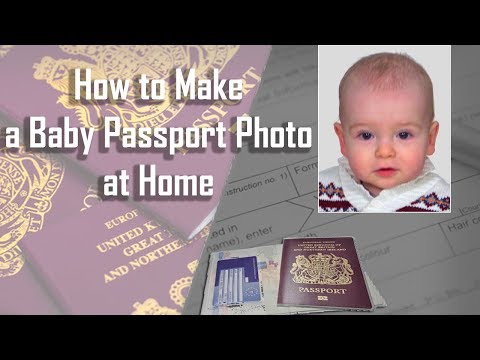
Taking a newborn passport photo is one of the most stressful tasks for new parents. Studios are overwhelming, and booths are impossible. The good news is that the ICA is slightly more lenient with infants, but technical standards still apply.
The 'Sheet and Window' Technique #
Don’t try to hold the baby up. Instead, lay a clean, white bedsheet on the floor near a large window (but not in direct sunlight). Lay the baby on the sheet. This provides a natural, flat background and even lighting without a startling flash.
The Psychological Framework #
- Timing: Aim for 30 minutes after a feed when the baby is calm.
- The Squeaky Toy Trick: Hold a squeaky toy directly behind the phone camera to ensure they look at the lens.
- The Support: Use rolled-up white towels under the sheet to support the sides of their head.
Global Cross-Border Standards: A Technical Matrix #
One of the biggest mistakes travelers make is assuming a "passport photo" is the same everywhere. If you use your Singapore photo for a US Visa, it will be rejected instantly due to different passport size photo dimensions.
| Destination | Dimensions | Background | Unique Requirement |
|---|---|---|---|
| Singapore (ICA) | 35mm x 45mm | White | 400x514 pixels; head size 25-35mm |
| USA Visa | 2" x 2" | White | Square format; no glasses allowed |
| China Visa | 33mm x 48mm | White | Specific head width (15-22mm) |
| Malaysia (eVisa) | 35mm x 50mm | White | Standardized white background |
For those traveling north, ensure you check the latest Malaysia Immigration photo requirements to avoid border delays. Similarly, the China Visa Application Service Center has strict rules regarding jewelry and forehead visibility.
Technical Metadata and File Specifications #
This is where most DIY attempts fail. Even if the photo looks perfect, the MyICA portal might reject the file itself.
Cracking the 400x514 Pixel Code #
The ICA specifies that digital photos must be exactly 400 pixels wide by 514 pixels high. This is a non-standard aspect ratio. If you upload a standard 4:3 photo, the portal will try to crop it automatically, often cutting off your chin.
JPEG Compression and the 60KB Limit #
Your photo must be in JPEG format and the file size must be less than 60KB. If you use a generic online compressor, you might lose so much detail that the AI can no longer see your biometrics. Using an online passport size photo editor designed for Singapore ensures the compression doesn't destroy facial data.
Why Traditional Photo Booths Are Failing the Digital Test #
Photo booths were designed for physical prints. They often have harsh, fixed lighting that creates "raccoon eyes"—a major AI rejection trigger. Furthermore, the "digital copy" from a booth is often a scanned version of a print, introducing "noise." In 2025, using your smartphone’s high-quality sensor and an AI-powered editor is objectively superior and more reliable.
The Myth of Professional Makeup and Glasses #
"Should I wear heavy makeup to look better?" The answer is no. Avoid contouring. Contouring is designed to change the perceived shape of your face using light and shadow. Since the ICA’s AI is looking for your actual bone structure, heavy makeup can lead to a biometric mismatch.
The Safety Net: Our Lifetime Remake Guarantee #
Government regulations change. By the time you submit your application next month, the ICA might update their background contrast requirements. This is why we offer a lifetime remake guarantee. If your photo is rejected for any compliance reason, we fix it. It's the ultimate peace of mind for a process that's becoming increasingly automated.
Frequently Asked Questions #
What is the exact SG passport photo size for digital upload? #
The digital requirement is 400 pixels wide by 514 pixels high, with a file size under 60KB in JPEG format.
Can I take my own passport photo with a phone? #
Yes, provided you avoid "selfie" distortion, use a white background, ensure even lighting, and use a tool to crop the image to the correct biometric proportions.
Why was my passport photo rejected for "eyebrows"? #
The ICA's facial recognition software uses eyebrows as a key facial anchor point. If they are even partially covered by hair, the system cannot verify your identity.
Final Checklist Before You Upload #
Run through this quick list before you hit "Submit":
- Eyebrows: Are they 100% visible?
- Contrast: Are you wearing a dark shirt?
- Expression: Is your mouth closed and face neutral?
- Lighting: Are there any shadows behind your ears or on the wall?
- Dimensions: Is the file exactly 400x514 pixels and under 60KB?
By following this guide and using a professional free passport photo app or editor, you ensure your application moves through the MyICA system without a hitch. Safe travels!
Ready to Create Your Photo?
Get your perfect passport, IC, or visa photo in minutes. AI-powered, ICA-compliant, instant download.
Create Your Photo Now