The Ultimate ICA Passport Photo Masterclass: 2025 Approval Guide
A comprehensive deep dive into mastering the ICA's strict passport photo requirements. We cover everything from biometric science to newborn hacks and digital-first solutions to guarantee your application's success.
If you’ve ever stood in the ICA Building at Kallang Road, watching the queue numbers slowly tick up while clutching a rejected application, you know a very specific kind of frustration. Usually, it isn't the paperwork that fails you; it’s the photo. Maybe there was a subtle shadow behind your ear, or your hair draped over your eyebrows just enough to trip a biometric scanner. When using a modern passport photo app, these common human errors are caught instantly, but doing it manually requires a deep understanding of technical precision.
The Immigration & Checkpoints Authority (ICA) isn't being difficult for the sake of it. Singapore uses some of the most advanced automated border control systems globally. For those gates at Changi Airport to whisk you through in seconds, your digital photo must be near-perfect. I’ve spent years analyzing what makes a photo compliant, and I’ll tell you this: you don't need an expensive studio. You just need to understand the logic behind the rules. Let’s break down how you can guarantee an ICA-approved photo from home, whether you're renewing your own IC or trying to capture a compliant shot of a squirming newborn.
The Science Behind the Rules: Why the ICA Cares About Your Ears and Eyebrows #
When you upload a photo to the MyICA portal, a human clerk isn't the first person to see it. An algorithm is your first gatekeeper. This software looks for specific biometric markers: the exact distance between your pupils, the width of your nose, and the sharp outline of your jaw.
Biometric Data and Facial Recognition #
Modern facial recognition relies on "feature extraction." If your hair covers your eyebrows, the software loses a critical anchor point for measuring the upper third of your face. If you wear heavy-framed glasses that cast shadows on your eyes, the system might fail to calculate your inter-pupillary distance accurately. This is why the ICA insists on a "neutral expression" and an unobstructed face. It’s not a fashion critique; it’s about data integrity. For the Changi Airport Automated Clearance to work, the photo on your chip must match the live scan of your face with high mathematical precision.
The ICAO 9303 Standard #
Singapore adheres to the ICAO Document 9303 standards. This is the global manual for machine-readable travel documents. It dictates the 35mm by 45mm dimensions and the specific requirement that the head occupies between 25mm to 35mm of that height (from chin to crown). By following these, Singapore ensures your passport is recognized just as easily in London or Tokyo as it is at home.
| Requirement | Specification |
|---|---|
| SG Passport Photo Size | 35mm (width) x 45mm (height) |
| Digital Resolution | At least 600 x 400 pixels |
| Head Height (Chin to Crown) | 25mm to 35mm |
| File Format | JPEG / JPG |
| File Size | Maximum 2.0 MB |
| Background | Plain white (no shadows/patterns) |
Setting Up Your 'Home Studio' Without Spending a Cent #
You don't need a professional DSLR or a ring light. Your smartphone is more than capable. In fact, most modern smartphone cameras produce higher-resolution images than the aging photo booths found in MRT stations. The secret is the environment and the lighting.
The Golden Rule of Natural Light #
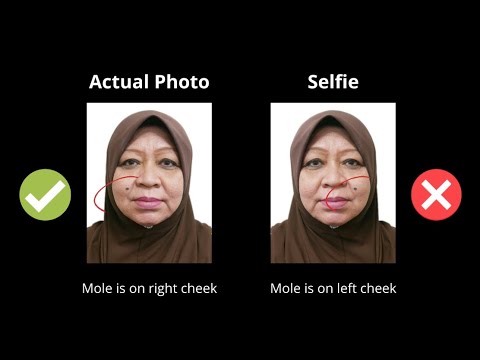
Forget your living room's ceiling light. It creates "raccoon eyes"—harsh shadows in your eye sockets and under your nose. Instead, find a large window between 10:00 AM and 2:00 PM when the light is bright but diffused. Face the window directly so the light hits your face evenly. This "flat lighting" is the gold standard for ID photos because it fills in shadows that a computer might mistake for a facial feature. Avoid direct sunlight, as it can cause "hot spots" on your forehead or cheeks, leading to an automated rejection.
The 'Portrait Mode' Trap #
Here is a common mistake: using "Portrait Mode" on an iPhone or Android device. These modes use AI to create a artificial shallow depth of field (bokeh), blurring the background. However, the AI often gets confused and blurs the edges of your ears or the wisps of your hair. The ICA Passport Photo Guidelines require the entire head to be in sharp focus. Use the standard photo mode, stand against a plain white wall, and keep the camera about 1.5 meters away. This distance helps avoid "barrel distortion," a lens effect that can make your nose look larger and your face appear rounded.
The Adult Checklist: Avoiding the Most Common Rejections #
I’ve seen photos rejected for the tiniest infractions. To ensure your ica passport photo requirement is met, run through this definitive checklist before you hit submit:
- The Eyebrow Rule: Your eyebrows must be fully visible. If you have bangs (fringe), tuck them behind your ears or pin them up. The ICA's automated system uses the eyebrows to determine the horizontal orientation of your face.
- The Ear Secret: While the ICA doesn't explicitly state your ears must be seen in every case, having them visible is the safest way to pass. It helps the system verify the full width of your face and ensures no hair is "slimming" your facial profile.
- Shoulders and Clothing: Wear something that contrasts with a white background. A white t-shirt will make you look like a floating head—an immediate rejection. Go for dark navy, black, or deep green.
- Posture and Eyes: Sit or stand straight. Your head should not be tilted left, right, or tipped forward. Your eyes must be wide open, looking directly at the camera lens, and not at the phone screen.
Glasses and Glare: To Wear or Not to Wear? #
My honest advice? Take them off. Even if you wear glasses daily, the ICA allows photos without them. If you must wear them, there can be no tint, and absolutely no reflection on the lenses. Frames cannot cover any part of your eyes. For most, it’s easier to remove them for 30 seconds than to risk a rejection because of a tiny glint of light from your window.
Mastering the Newborn Passport Photo: A Parent’s Survival Guide #
This is the final boss of passport photography. Getting a three-week-old to meet ICA standards—eyes open, mouth closed, head straight, no hands visible—can feel impossible. However, the Ministry of Home Affairs oversees policies that allow for slightly more leniency for children under six years old, but the fundamental biometric rules still apply.

The Bedsheet Method for Infants #
Do not try to hold the baby up. You will inevitably get your hand in the frame, or the baby’s clothes will bunch up awkwardly. Instead, lay a plain white bedsheet on the floor or a firm mattress. Lay the baby on top. Stand over them (use a stool if you need height) and take the photo from directly above. This ensures the background is a flat, even white, and the baby’s head is supported and straight. If the baby's head tilts, use a small rolled-up towel under the bedsheet to create a subtle "cradle" that keeps them centered.
Managing the 'Neutral Expression' for Toddlers #
For toddlers, "neutral expression" is a tall order. The best window is 30 minutes after a nap and a feeding. They are alert but not yet overstimulated. To get them to look at the lens without a wide grin, don't say "Cheese!" Instead, hold a small toy right above the camera lens. You want that split-second of curiosity rather than a full-blown laugh. A newborn passport photo can be tricky, so take dozens of shots; eventually, you will catch that one frame where they look straight ahead.
Religious Headgear and Cultural Nuances #
Singapore is a multi-cultural hub, and the ICA guidelines reflect this. If you wear a Hijab, Turban, or other religious headgear, it is perfectly acceptable, but two rules are non-negotiable:
- No Shadows: The headgear must not cast any shadows across your forehead, eyes, or cheeks.
- Full Face Visibility: Your face from the bottom of your chin to the top of your forehead, and both edges of your face, must be clear. This means the Hijab should be pinned back enough to show the full facial oval. Avoid patterned scarves; a solid, dark-colored headgear works best against the white background.
Singapore vs. Malaysia: Navigating Regional Differences #
Many Singapore residents are Malaysians or frequently travel across the Causeway. It's easy to get confused between the two sets of rules. While Singapore is strictly 35x45mm with a white background, the Malaysia passport photo requirement (Jabatan Imigresen Malaysia) is technically similar but involves different head-to-frame ratios.
| Feature | Singapore (ICA) | Malaysia (Immigration) |
|---|---|---|
| Photo Dimensions | 35mm x 45mm | 35mm x 50mm |
| Head Height | 25mm to 35mm | 25mm to 30mm |
| Background Color | White | White |
If you're using a passport size photo editor, make sure you select the correct country profile to ensure the crop matches the specific national standard. Using the wrong dimensions is the number one cause of rejection for regional travelers.
Why a Digital-First Passport Photo Maker is the Future #
The era of the $10 "instant" photo booth is ending. Those machines often use outdated lighting and don't provide a digital file in the precise 600x400 pixel ratio the MyICA portal prefers. Going digital-first means you can take 50 shots until you get the perfect one.
This is where a dedicated passport photo maker like IC Photo Singapore comes in. Instead of guessing if your head is the right size (the 25mm–35mm rule), the AI does the heavy lifting. It validates your photo against the latest ICA Passport Photo Guidelines before you even hit 'submit'. It checks for lighting balance, background contrast, and biometric alignment instantly, ensuring you don't wait weeks only to receive a rejection email.
Frequently Asked Questions #
What is the exact sg passport photo size for 2025? #
The current requirement is 35mm wide by 45mm high. If uploading to the MyICA portal, the file should be in JPEG format, no larger than 2MB, and ideally 600x400 pixels in dimension.
Can I wear a white shirt for my passport photo? #
It is highly discouraged. A white shirt blends into the mandatory white background, making your shoulders disappear. This can cause the biometric software to fail to identify your torso, leading to a rejection. Wear a dark or vibrant color instead.
Do I need to show my ears in an ICA photo? #
While not strictly mandatory for everyone, showing your ears is the safest way to ensure your photo is accepted. It allows the software to clearly define the boundaries of your face, which is critical for facial recognition data.
Is there a free passport photo app I can use? #
Yes, IC Photo Singapore offers a free basic service to check your photo's compliance. Specialized tools are better than generic photo editors because they are pre-programmed with Singapore's specific 35x45mm biometric requirements.
Final Checklist and Submission Tips #
Before you upload to the Official ICA Portal, run this final sanity check:
- The 3-Month Rule: Your photo must be taken within the last three months. The ICA can and will compare your new photo to your old one.
- File Format: Ensure it is a .jpg or .jpeg. Other formats like .png or .heic (common on iPhones) may not be accepted by the portal.
- No Filters: Even basic "beauty" filters can smooth skin textures that biometric scanners need for identification. Turn off all enhancements.
- Check the Background: Is it truly white, or does it look grey/yellow? Pure white is the requirement.
Applying for a passport shouldn't be a gamble. By treating your photo as a data map rather than a portrait, you can skip the studio and the stress. Take control of your own biometrics, use the right tools, and you'll be through the airport in no time.
Ready to Create Your Photo?
Get your perfect passport, IC, or visa photo in minutes. AI-powered, ICA-compliant, instant download.
Create Your Photo Now